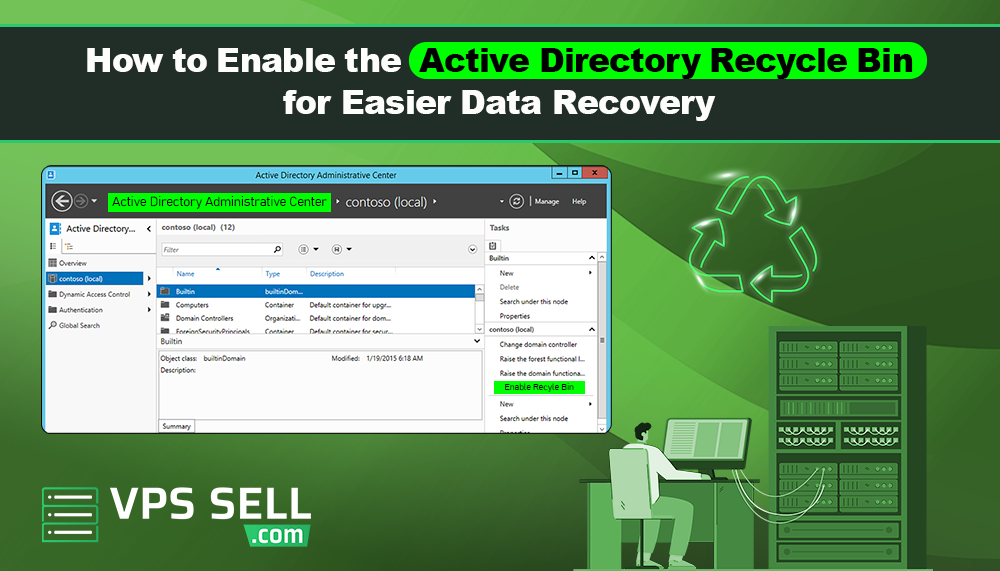
How to Enable the Active Directory Recycle Bin for Easier Data Recovery
Managing users, groups, and organizational units in Active Directory is an important part of Windows Server administration. Sometimes administrators accidentally delete important Active Directory objects, which can create serious problems for businesses and IT environments.
The Active Directory Recycle Bin is a useful feature that helps administrators recover deleted objects quickly without restarting domain services or restoring full backups.
In this article, we will explain what the Active Directory Recycle Bin is, why it is important, and how to enable it for easier data recovery.
What Is the Active Directory Recycle Bin?
The Active Directory Recycle Bin is a feature in Windows Server that allows administrators to restore deleted Active Directory objects easily.
Before this feature was introduced, recovering deleted users or groups usually required restoring backups and performing complicated recovery tasks. With the Recycle Bin feature, deleted objects can be restored with most of their original settings and attributes. This helps reduce downtime and makes Active Directory management much easier.
Benefits of the Active Directory Recycle Bin
Enabling the Active Directory Recycle Bin provides several important benefits for businesses and IT administrators.
- Easier Data Recovery
Deleted users, groups, and organizational units can be restored quickly without complex recovery procedures.
- Reduced Downtime
Administrators can recover important objects faster, helping businesses continue operations without major interruptions.
- Preserves Object Attributes
When objects are restored, many important attributes and settings are also recovered automatically.
- Improves Active Directory Management
The Recycle Bin feature makes Active Directory administration safer and more efficient.
Requirements Before Enabling the Feature
Before enabling the Active Directory Recycle Bin, there are a few requirements to check.
- Forest Functional Level
Your Active Directory forest functional level must be Windows Server 2008 R2 or higher.
- Administrative Permissions
You need Enterprise Admin or Domain Admin permissions to enable the feature.
- Active Directory Module
PowerShell and Active Directory management tools should be available on the server.
How to Enable Active Directory Recycle Bin
You can enable the Active Directory Recycle Bin using either the Active Directory Administrative Center or PowerShell.
Enable Using Active Directory Administrative Center
Follow these simple steps:
- Open Server Manager.
- Go to Tools.
- Open Active Directory Administrative Center.
- Select your domain name from the left panel.
- On the right side, click Enable Recycle Bin.
- Confirm the action.
- Wait for replication to complete across domain controllers.
Once enabled, the feature cannot be disabled later.
Enable Using PowerShell
You can also enable the feature using PowerShell.
Open PowerShell as Administrator and run the following command:
Enable-ADOptionalFeature 'Recycle Bin Feature'-Scope ForestOrConfigurationSet `-Target 'dc=yourdomain,dc=com'
Replace yourdomain.com with your actual domain name. After running the command, the Active Directory Recycle Bin will be enabled for the forest.
How to Restore Deleted Objects
After enabling the feature, administrators can restore deleted objects easily.
Restore Using Active Directory Administrative Center
- Open Active Directory Administrative Center.
- Select Deleted Objects.
- Find the deleted object you want to recover.
- Right click the object.
- Click Restore or Restore To.
The object will be restored with most of its original settings.
Why Businesses Should Enable the Feature
Accidental deletion of user accounts, groups, or organizational units can affect business operations. Recovering these objects quickly is important for reducing downtime and avoiding service interruptions.
The Active Directory Recycle Bin provides a simple and reliable recovery solution for Windows Server environments.
It is especially useful for:
- Business networks
- Enterprise IT environments
- Educational institutions
- Hosting providers
- Managed IT services
Best Practices for Active Directory Recovery
Even with the Recycle Bin enabled, businesses should still follow good backup and security practices.
Recommended best practices include:
- Regular Active Directory backups
- Strong administrator access control
- Monitoring and logging changes
- Testing recovery procedures
- Using secure password policies
These practices help improve overall server security and reliability.
Final Thoughts
The Active Directory Recycle Bin is a powerful feature that helps administrators recover deleted objects quickly and easily. It improves data recovery, reduces downtime, and simplifies Active Directory management.
Enabling this feature can help businesses protect important user accounts, groups, and organizational units from accidental deletion.
For organizations using Windows Server and Active Directory, enabling the Recycle Bin is an important step toward better server management and disaster recovery planning.