Top Windows Web Hosting Control Panels: Features & Comparison Guide
Managing a Windows web server can involve several technical tasks, including creating websites, configuring domains, managing databases, setting up email accounts, and monitoring server resources. A Windows web hosting control panel makes these tasks easier by providing a graphical interface.
Instead of managing every service through Windows Server tools or command-line instructions, administrators can use a central dashboard to manage different hosting services. Choosing the right control panel is important for businesses, developers, and hosting providers. The best option depends on the applications you run, the level of control you need, and your server management experience.
What Is a Windows Web Hosting Control Panel?
A Windows web hosting control panel is software that helps users manage websites and hosting services on a Windows Server. It provides a central interface for managing common hosting tasks, such as:
- Creating and managing websites.
- Configuring domains and DNS records.
- Managing email accounts.
- Creating and managing databases.
- Uploading and organising website files.
- Installing SSL certificates.
- Managing hosting accounts.
- Monitoring server resources.
These tools are particularly useful for Windows VPS users who host multiple websites or applications.
Top Windows Web Hosting Control Panels
Here are some popular control panels and server management tools to consider when working with Windows hosting.
1. Plesk
Plesk is a widely used web hosting control panel that supports both Windows and Linux server environments. It provides a central dashboard for managing websites, domains, databases, email, and hosting services.
Key Features:
- Website and domain management.
- Support for Windows hosting technologies, including IIS.
- ASP.NET and PHP application support.
- Database management.
- Email account management.
- SSL certificate management.
- Backup and restoration tools.
- WordPress Toolkit and additional extensions.
Best For: Businesses, developers, and hosting providers that need a comprehensive hosting management platform.
Plesk is a suitable choice when you want to manage multiple websites and hosting services through one interface. Its available features depend on the licence edition and server configuration.
2. SolidCP
SolidCP is an open-source hosting control panel designed for Windows Server environments. It provides tools for managing hosting services and customer accounts. It is commonly considered by hosting providers that want to manage multiple customers and hosting resources.
Key Features:
- Website management through IIS.
- Domain and DNS management.
- Database management.
- Email service integration.
- FTP account management.
- Hosting account management.
- Multi-server management capabilities.
Best For: Hosting providers and experienced administrators looking for an open-source Windows hosting control panel.
SolidCP can be a useful option when licensing costs are an important consideration. However, administrators should review its current compatibility, maintenance, and support requirements before using it in a production environment.
3. Windows Admin Center
Windows Admin Center is a Microsoft management tool for administering Windows Server environments. Unlike traditional hosting control panels, it focuses on server administration rather than providing a complete customer-facing hosting management system.
Key Features:
- Server monitoring and management.
- System resource information.
- Windows service management.
- Storage and network management.
- Firewall and security configuration.
- Windows update management.
- Remote server administration.
Best For: System administrators and IT teams that need a central interface for managing Windows servers.
Windows Admin Center is useful for server administration, but it does not replace a dedicated web hosting control panel when you need customer accounts, hosting packages, or website-level management.
Windows Web Hosting Control Panel Comparison
The following table provides a simple comparison of the three options.
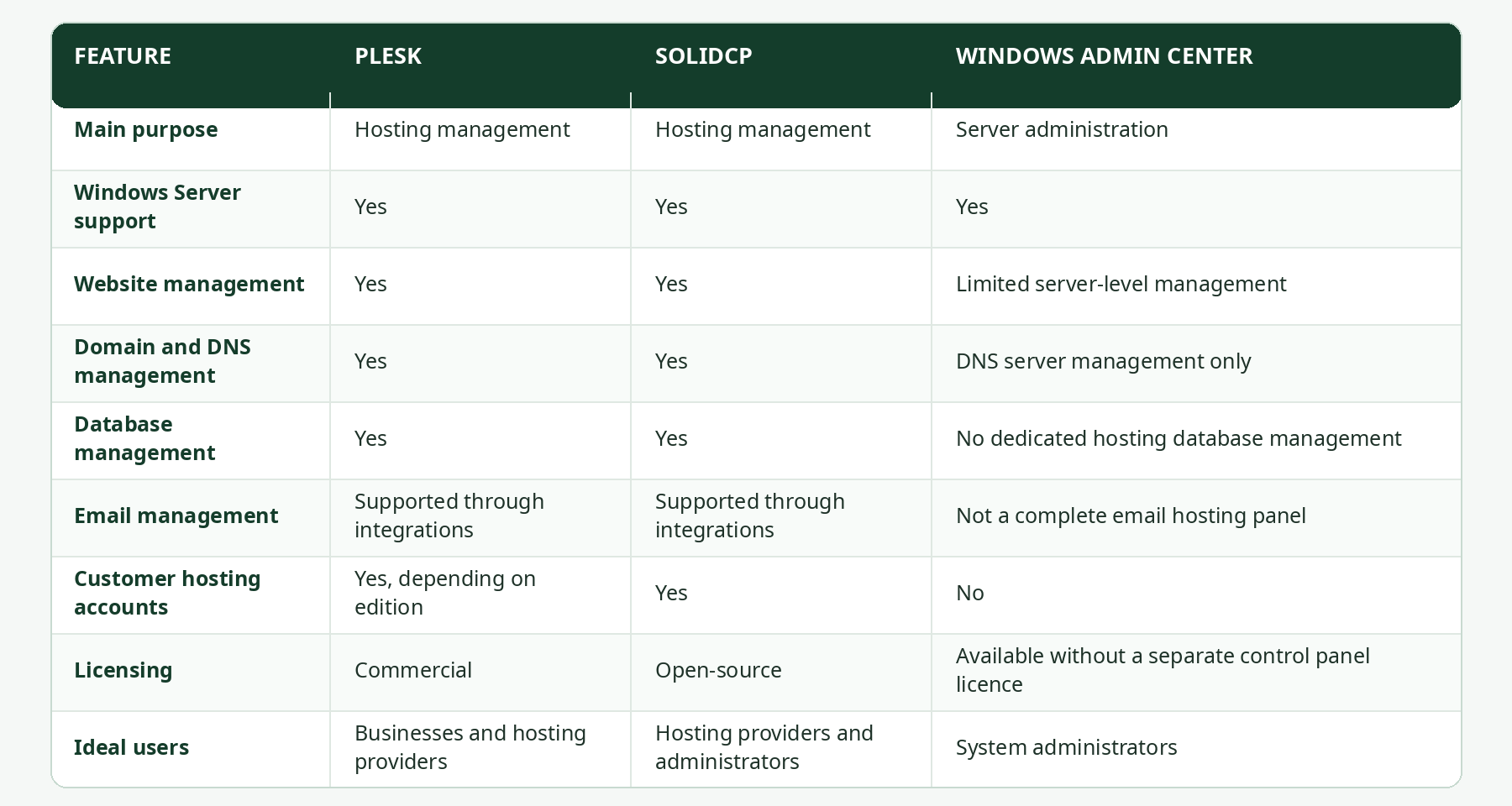
Note: Features and availability depend on software versions, editions, integrations, and server configuration.
Important Features to Check Before Choosing a Control Panel
Not every control panel offers the same features. Before installing one on your Windows VPS, consider the following requirements.
1. Windows Server Compatibility
Check whether the control panel supports your Windows Server version. Also review its requirements for IIS, .NET components, and other required services.
2. Website and Application Support
If you plan to host ASP.NET applications, check the available support for IIS, the required .NET versions, and application configuration.
3. Database Management
Choose a control panel that supports the database technologies your applications require, such as Microsoft SQL Server or MySQL.
4. Security Management
Look for useful security management options, including SSL certificate support, access permissions, firewall integration, and account management.
5. Backup and Recovery
Regular backups are important for protecting website files, databases, and application data. Check whether the panel includes backup tools or supports external backup integrations.
6. Resource Usage
A control panel also consumes server resources. Make sure your VPS has enough CPU, RAM, and storage to run both the control panel and your hosted applications.
7. Licensing and Support
Some control panels require commercial licences, while others are open-source. Compare the licensing terms, available technical support, documentation, and update frequency before making a decision.
Why Use a Windows VPS for Web Hosting?
A Windows VPS provides a virtual server environment where you can install Windows Server and configure the software required for your applications. It can be useful for businesses and developers that depend on Windows-based technologies, including ASP.NET applications, Microsoft SQL Server, and IIS. With a Windows VPS, you can also choose a suitable hosting control panel, manage server resources, and configure the environment according to your technical requirements. For applications that need specific Windows Server configurations, a VPS provides more control than many basic shared hosting environments.
Explore Windows VPS Hosting with VPSSell
Choosing the right control panel is only one part of setting up a Windows hosting environment. You also need suitable server resources, a compatible operating system, proper security settings, and regular maintenance. VPSSell provides VPS hosting solutions for different business and technical requirements. A Windows VPS can give developers and businesses a suitable environment for hosting Windows-based applications and managing their own server configurations. Whether you are hosting business applications, websites, or development projects, explore the available VPS solutions at VPSSell .
Final Thoughts
Windows web hosting control panels make server and website management easier by bringing important hosting tasks into a central interface. Plesk is a comprehensive option for managing websites and hosting services, while SolidCP offers an open-source alternative for Windows hosting management. Windows Admin Center is more suitable for general Windows Server administration rather than customer-facing hosting management.
Before choosing a control panel, consider your application requirements, server resources, security needs, licensing, and technical experience. Selecting the right combination of Windows VPS and management software can help you build a suitable hosting environment for your projects.